Image metadata editing
This script shows the basics of image metadata editing in JPG images. It can be useful when improving the documentation of field work by adding additional information like descriptions or gps coordinates to the image metadata, and also for the correction of errors as wrong time settings In R, metadata editing relies on the exif tool, accessed with the exifr package. To get more information on this R package, visit the documentation.
If you have questions, suggestions, spot errors, or want to contribute, get in touch with us through planthub@idiv.de.
Author: David Schellenberger Costa
Requirements
To run the script, the following is needed:
the example image files available here or any other JPG images to test the functions with
some R libraries that may need to be installed
Code
# load in libraries
library(data.table) # handle large datasets
library(exifr) # edit image metadata
library(sf) # read GPS data from GPX files

# clear workspace
rm(list = ls())

# set working directory
setwd(paste0(.brd, "PlantHub/code repository/data cleaning, manipulation, visualization, and R library cheatsheets"))
JPG images come with metadata, and we can see and modify it to a certain extend in the Windows Explorer, but for batch processing and fine-grained metadata editing, the exifr package is much better. Let us first read in the metadata of a several images using the read_exif function.
pics <- paste0("testpic", 1:3, ".jpg")
exif <- data.table(read_exif("testpic1.jpg"))
length(exif) # 215 entries

exif <- data.table(read_exif("testpic2.jpg"))
length(exif) # 24 entries

exif <- data.table(read_exif(pics))
dim(exif) # 264 entries
As we can see, the number of metadata entries provided varies massively between images. Some have few information attached, while others have a lot.
1) DateTimeOriginal
One common use-case for metadata editing is the afterwards synchronization of creation date and time between different cameras, or for one camera, if time zone information was wrong. There are many metadata fields dealing with times, but the standard one is called “DateTimeOriginal”. If you do not find this field, the creation date may also be called “CreateDate”. We can specifically extract this metadata information by using the tags argument:
pics <- paste0("testpic", 1:3, ".jpg")
(exif <- data.table(read_exif(pics, tags = "DateTimeOriginal")))
As we can see, image 2 has no DateTimeOriginal information at all. Let us try to add this, using the current time just for illustration, using the exiftool_call function:
exiftool_call(args = paste("-exif:DateTimeOriginal=\"", Sys.time(), "\" \"",
    pics[2], "\" -overwrite_original_in_place -m",
    sep = ""
))

# check the result
read_exif(pics[2], tags = "DateTimeOriginal")$DateTimeOriginal
"perl" "C:/Users/psy02jpw/AppData/Local/Programs/R/R-4.3.2/library/exifr/exiftool/exiftool.pl" -exif:DateTimeOriginal="2026-03-16 14:13:24.788684" "testpic2.jpg" -overwrite_original_in_place -m
This should have worked. Now let us set it to a specific time, using the POSIXct format:
newTime <- as.POSIXct("2021-01-01 12:00:00", format = "%Y-%m-%d %H:%M:%S")

exiftool_call(args = paste("-exif:DateTimeOriginal=\"", newTime, "\" \"",
    pics[2], "\" -overwrite_original_in_place -m",
    sep = ""
))
read_exif(pics[2], tags = "DateTimeOriginal")$DateTimeOriginal
"perl" "C:/Users/psy02jpw/AppData/Local/Programs/R/R-4.3.2/library/exifr/exiftool/exiftool.pl" -exif:DateTimeOriginal="2021-01-01 12:00:00" "testpic2.jpg" -overwrite_original_in_place -m
As we can see, it is straightforward to set entries. But what about modifying already existing ones, e.g. setting the time two hours back? We can do this easily, however, we need to keep in mind that the unit of Posixct objects is seconds, so wo hours back would be 2 * 3600 seconds.
# get original DateTimeOriginal
oriTime <- read_exif(pics[2], tags = "DateTimeOriginal")$DateTimeOriginal

# modify DateTimeOriginal
exiftool_call(args = paste("-exif:DateTimeOriginal=\"", as.POSIXct(oriTime, format = "%Y:%m:%d %H:%M:%S") - 2 * 3600,
    "\" \"", pics[2], "\" -overwrite_original_in_place -m",
    sep = ""
))
read_exif(pics[2], tags = "DateTimeOriginal")$DateTimeOriginal
"perl" "C:/Users/psy02jpw/AppData/Local/Programs/R/R-4.3.2/library/exifr/exiftool/exiftool.pl" -exif:DateTimeOriginal="2021-01-01 10:00:00" "testpic2.jpg" -overwrite_original_in_place -m
This worked. Note that we used the as.POSIXct function to convert the character string into the POSIXct object, specifiying the format as %Y:%m:%d %H:%M:%S.
The exiftool_call function accepts vectorized arguments, allowing us to update several images simultaneously.
(exif <- data.table(read_exif(pics, tags = "DateTimeOriginal")))
exiftool_call(args = paste("-exif:DateTimeOriginal=\"",
    as.POSIXct(exif$DateTimeOriginal, format = "%Y:%m:%d %H:%M:%S") - 2 * 3600,
    "\" \"", pics, "\" -overwrite_original_in_place -m",
    sep = ""
))
(data.table(read_exif(pics, tags = "DateTimeOriginal")))
"perl" "C:/Users/psy02jpw/AppData/Local/Programs/R/R-4.3.2/library/exifr/exiftool/exiftool.pl" -exif:DateTimeOriginal="2015-06-06 11:44:47" "testpic1.jpg" -overwrite_original_in_place -m -exif:DateTimeOriginal="2021-01-01 08:00:00" "testpic2.jpg" -overwrite_original_in_place -m -exif:DateTimeOriginal="2018-10-27 12:50:58" "testpic3.jpg" -overwrite_original_in_place -m
This did not work. For some reasons, we got the date time of the last image written into all image files. To avoid this, it is always saver to run the changes one by one in a loop. Fortunately, the “CreateDate” field has the same information stored as the “DateTimeOriginal” field in our images, so let’s try to repair this.
for (i in seq_along(pics)) {
    if (is.na(exif$CreateDate[i])) {
        exiftool_call(args = paste("-exif:DateTimeOriginal=\"", "",
            "\" \"", pics[i], "\" -overwrite_original_in_place -m",
            sep = ""
        ))
    } else {
        exiftool_call(args = paste("-exif:DateTimeOriginal=\"",
            as.POSIXct(exif[i]$CreateDate, format = "%Y:%m:%d %H:%M:%S"),
            "\" \"", pics[i], "\" -overwrite_original_in_place -m",
            sep = ""
        ))
    }
}

# check results
(data.table(read_exif(pics, tags = "DateTimeOriginal")))
"perl" "C:/Users/psy02jpw/AppData/Local/Programs/R/R-4.3.2/library/exifr/exiftool/exiftool.pl" -exif:DateTimeOriginal="2015-06-06 13:44:47" "testpic1.jpg" -overwrite_original_in_place -m

"perl" "C:/Users/psy02jpw/AppData/Local/Programs/R/R-4.3.2/library/exifr/exiftool/exiftool.pl" -exif:DateTimeOriginal="" "testpic2.jpg" -overwrite_original_in_place -m

"perl" "C:/Users/psy02jpw/AppData/Local/Programs/R/R-4.3.2/library/exifr/exiftool/exiftool.pl" -exif:DateTimeOriginal="2018-10-27 14:50:58" "testpic3.jpg" -overwrite_original_in_place -m
This worked, we change the metadata to its original state.
2) GPS coordinates and elevation
Nowadays, smartphones can add GPS coordinates directly to images, but if using a camera, this is not always the case. So let us see how can bring GPS information into the image metadata. GPS information can be stored as individual waypoints or tracks, i.e. automatically recorded points that show a continuous movement of the camera. The st_layers function can be used to see which layers are available.
# look at available layers
temp <- data.table(st_layers("200225.gpx"))
temp
In general, when a GPS device was tracking our movements constantly, we would calculate time difference between individual track points and the creation dates of the images and select the one closest to the image creation date. If we had only individual waypoints, we would need to introduce a maximum difference at which we still “accept” a time match, as larger differences potentially indicate deviations from the waypoint coordinates.
# get GPS track_points data
gps <- st_read("200225.gpx", layer = "track_points")
plot(gps$geometry) # have a look at the data

# create sample image creation times
testTimes <- as.POSIXct(runif(10, as.numeric(min(gps$time)), as.numeric(max(gps$time))))

# calculate minimum time difference and extract corresponding track point
res <- sapply(testTimes, function(x) order(abs(x - gps$time))[1])

# add image creation locations to map
points(gps$geometry[res], col = "red", cex = 3, lwd = 3)
Reading layer `track_points' from data source
  `C:\Users\psy02jpw\programing\R\PlantHub\code repository\data cleaning, manipulation, visualization, and R library cheatsheets\200225.gpx'
  using driver `GPX'
Simple feature collection with 4061 features and 26 fields
Geometry type: POINT
Dimension:     XY
Bounding box:  xmin: 9.940094 ymin: 50.71881 xmax: 11.44712 ymax: 50.95654
Geodetic CRS:  WGS 84
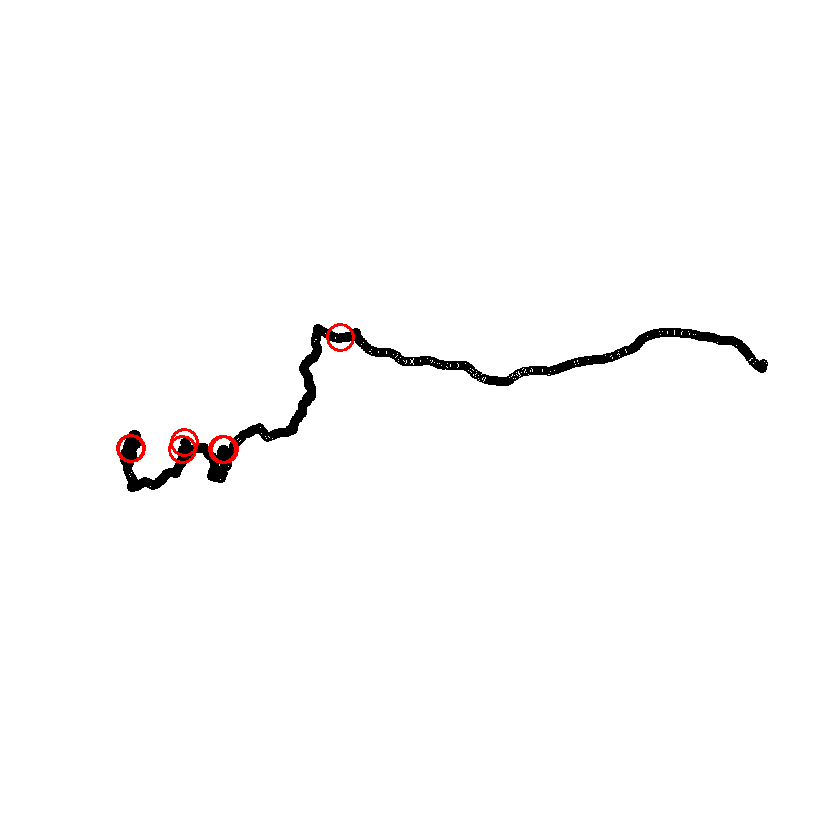
Our sample images have been taken at non-matching times, but let’s just add gps coordinates from the track.
testPoints <- gps[sample(seq_len(nrow(gps)), 3), ]

# to transfer out data, we need to get it out of the sf object
testCoords <- st_coordinates(testPoints)

# Now let's use a loop to transfer the coordinates, and this time, we will change
# several properties at once.
for (i in seq_along(pics)) {
    exiftool_call(args = paste("-exif:GPSLatitudeRef=N -exif:GPSLongitudeRef=E",
        " -exif:GPSAltitudeRef=\"Above Sea level\" -exif:GPSMapDatum=WGS-84",
        " -exif:GPSLatitude=", testCoords[i, 2],
        " -exif:GPSLongitude=", testCoords[i, 1],
        " -exif:GPSAltitude=", testPoints[i, ]$ele,
        " \"", pics[i], "\" -overwrite_original_in_place -m",
        sep = ""
    ))
}

# check results only showing fields starting with "GPS"
(data.table(read_exif(pics, tags = "GPS*")))

# Let's change the metadata to its original state.
for (i in seq_along(pics)) {
    exiftool_call(args = paste("-exif:GPSLatitudeRef= -exif:GPSLongitudeRef= -exif:GPSAltitudeRef= -exif:GPSMapDatum=",
        " -exif:GPSLatitude=",
        " -exif:GPSLongitude=",
        " -exif:GPSAltitude=",
        " \"", pics[i], "\" -overwrite_original_in_place -m",
        sep = ""
    ))
}
"perl" "C:/Users/psy02jpw/AppData/Local/Programs/R/R-4.3.2/library/exifr/exiftool/exiftool.pl" -exif:GPSLatitudeRef=N -exif:GPSLongitudeRef=E -exif:GPSAltitudeRef="Above Sea level" -exif:GPSMapDatum=WGS-84 -exif:GPSLatitude=50.7975449133664 -exif:GPSLongitude=9.96295155957341 -exif:GPSAltitude=245.27 "testpic1.jpg" -overwrite_original_in_place -m

"perl" "C:/Users/psy02jpw/AppData/Local/Programs/R/R-4.3.2/library/exifr/exiftool/exiftool.pl" -exif:GPSLatitudeRef=N -exif:GPSLongitudeRef=E -exif:GPSAltitudeRef="Above Sea level" -exif:GPSMapDatum=WGS-84 -exif:GPSLatitude=50.7702971901745 -exif:GPSLongitude=9.94920750148594 -exif:GPSAltitude=264.98 "testpic2.jpg" -overwrite_original_in_place -m

"perl" "C:/Users/psy02jpw/AppData/Local/Programs/R/R-4.3.2/library/exifr/exiftool/exiftool.pl" -exif:GPSLatitudeRef=N -exif:GPSLongitudeRef=E -exif:GPSAltitudeRef="Above Sea level" -exif:GPSMapDatum=WGS-84 -exif:GPSLatitude=50.7763423863798 -exif:GPSLongitude=10.0785622280091 -exif:GPSAltitude=438.5 "testpic3.jpg" -overwrite_original_in_place -m
"perl" "C:/Users/psy02jpw/AppData/Local/Programs/R/R-4.3.2/library/exifr/exiftool/exiftool.pl" -exif:GPSLatitudeRef= -exif:GPSLongitudeRef= -exif:GPSAltitudeRef= -exif:GPSMapDatum= -exif:GPSLatitude= -exif:GPSLongitude= -exif:GPSAltitude= "testpic1.jpg" -overwrite_original_in_place -m

"perl" "C:/Users/psy02jpw/AppData/Local/Programs/R/R-4.3.2/library/exifr/exiftool/exiftool.pl" -exif:GPSLatitudeRef= -exif:GPSLongitudeRef= -exif:GPSAltitudeRef= -exif:GPSMapDatum= -exif:GPSLatitude= -exif:GPSLongitude= -exif:GPSAltitude= "testpic2.jpg" -overwrite_original_in_place -m

"perl" "C:/Users/psy02jpw/AppData/Local/Programs/R/R-4.3.2/library/exifr/exiftool/exiftool.pl" -exif:GPSLatitudeRef= -exif:GPSLongitudeRef= -exif:GPSAltitudeRef= -exif:GPSMapDatum= -exif:GPSLatitude= -exif:GPSLongitude= -exif:GPSAltitude= "testpic3.jpg" -overwrite_original_in_place -m
3) IPTC information
Sometimes we want to add tags to the metadata that describe the image, location or process of taking it. We will use the IPTC “Caption-Abstract” field for this. EXIF and IPTC are both image metadata standards, and both can be read and written with the exiftool_call function. Let’s add some information to our sample images.
metadata <- c("A nice mountain", "A beautiful city", "A young mushroom")

for (i in seq_along(pics)) {
    exiftool_call(args = paste("-iptc:Caption-Abstract=\"", metadata[i], "\" \"",
        pics[i], "\" -overwrite_original_in_place -m",
        sep = ""
    ))
}

# Other metadata fields can be accessed the same way.
(data.table(read_exif(pics, tags = "Caption-Abstract")))

# Let's change the metadata to its original state.
for (i in seq_along(pics)) {
    exiftool_call(args = paste("-iptc:Caption-Abstract= \"", pics[i], "\" -overwrite_original_in_place -m",
        sep = ""
    ))
}
"perl" "C:/Users/psy02jpw/AppData/Local/Programs/R/R-4.3.2/library/exifr/exiftool/exiftool.pl" -iptc:Caption-Abstract="A nice mountain" "testpic1.jpg" -overwrite_original_in_place -m

"perl" "C:/Users/psy02jpw/AppData/Local/Programs/R/R-4.3.2/library/exifr/exiftool/exiftool.pl" -iptc:Caption-Abstract="A beautiful city" "testpic2.jpg" -overwrite_original_in_place -m

"perl" "C:/Users/psy02jpw/AppData/Local/Programs/R/R-4.3.2/library/exifr/exiftool/exiftool.pl" -iptc:Caption-Abstract="A young mushroom" "testpic3.jpg" -overwrite_original_in_place -m
"perl" "C:/Users/psy02jpw/AppData/Local/Programs/R/R-4.3.2/library/exifr/exiftool/exiftool.pl" -iptc:Caption-Abstract= "testpic1.jpg" -overwrite_original_in_place -m

"perl" "C:/Users/psy02jpw/AppData/Local/Programs/R/R-4.3.2/library/exifr/exiftool/exiftool.pl" -iptc:Caption-Abstract= "testpic2.jpg" -overwrite_original_in_place -m

"perl" "C:/Users/psy02jpw/AppData/Local/Programs/R/R-4.3.2/library/exifr/exiftool/exiftool.pl" -iptc:Caption-Abstract= "testpic3.jpg" -overwrite_original_in_place -m